
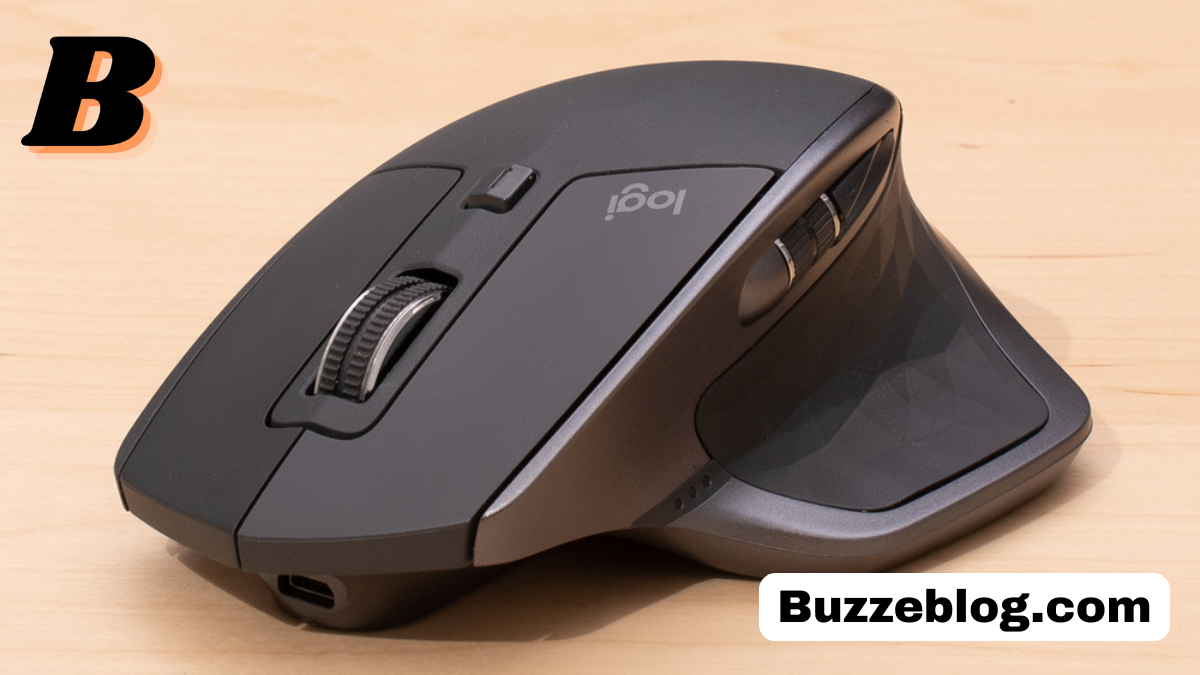
Introduction to MX Master 2S
The mx master 2s is one of those devices that quietly changes the way you work without making a lot of noise about it. At first glance, it looks like just another premium mouse, but once you start using it, you quickly realize it is built with a deep understanding of productivity, comfort, and efficiency. Designed by Logitech, a brand known for reliable peripherals, the mx master 2s has become a favorite among designers, developers, writers, and business professionals who spend long hours at their desks.
What makes the mx master 2s stand out is its perfect balance between advanced technology and user-friendly design. It is not overloaded with unnecessary features, but instead focuses on delivering exactly what professionals need to work faster and smarter. From its ergonomic shape to its customizable buttons, everything about the mx master 2s is crafted with purpose.
In this article, we will explore every aspect of the mx master 2s in detail. Whether you are considering buying it or just want to understand why it is so popular, this guide will give you a complete and expert-level understanding of the mx master 2s.
Design and Build Quality of MX Master 2S
The first thing you notice about the mx master 2s is its premium design. It does not look like a cheap plastic mouse; instead, it has a solid and durable feel that instantly communicates quality. The combination of matte plastic, textured grip, and metallic scroll wheel gives it a professional and modern look that fits perfectly on any workspace.
The ergonomic shape of the mx master 2s is another standout feature. It is designed to fit naturally in your hand, reducing strain during long working hours. The thumb rest is positioned perfectly, allowing your hand to relax while still maintaining full control over the mouse. This makes a big difference for people who work for many hours without breaks.
Durability is also a strong point of the mx master 2s. The buttons feel solid, the scroll wheels are smooth yet sturdy, and the overall construction is built to last. Even after months or years of use, the mx master 2s maintains its performance and appearance, making it a reliable long-term investment.
Performance and Precision of MX Master 2S
When it comes to performance, the mx master 2s truly shines. It is equipped with Logitech’s Darkfield High Precision sensor, which allows it to track on almost any surface, including glass. This is especially useful for users who travel or work in different environments where a mouse pad may not always be available.
The mx master 2s offers adjustable DPI settings, allowing you to control the sensitivity based on your needs. Whether you are doing precise design work or simply browsing the web, you can easily switch between different levels of speed and accuracy. This flexibility makes the mx master 2s suitable for a wide range of tasks.
Another important aspect of performance is consistency. The mx master 2s delivers smooth and lag-free movement, ensuring that every action is precise and responsive. This level of reliability is essential for professionals who depend on their tools to perform without errors or delays.
Unique Features of MX Master 2S

One of the reasons why the mx master 2s is so popular is its unique set of features that go beyond basic mouse functionality. One of the most notable features is the dual scroll wheels. The main scroll wheel supports both smooth and ratchet scrolling, allowing you to switch between precise line-by-line scrolling and fast free-spinning scrolling.
The thumb wheel is another feature that adds extra convenience. It is especially useful for horizontal scrolling, which is important for tasks like editing spreadsheets or working on timelines in video editing software. This small addition can significantly improve productivity in certain workflows.
Gesture controls are also a part of the mx master 2s experience. By holding down a button and moving the mouse in different directions, you can perform custom actions such as switching applications or navigating between desktops. These features make the mx master 2s more than just a mouse; it becomes a powerful tool for efficiency.
Battery Life and Charging Experience
Battery performance is an area where the mx master 2s excels. It comes with a rechargeable battery that can last up to 70 days on a single charge, depending on usage. This means you do not have to worry about constantly recharging or replacing batteries, which is both convenient and cost-effective.
Charging the mx master 2s is simple and quick. It uses a micro-USB cable, and even a short charging session can provide several hours of usage. This is particularly useful when you are in a hurry and need your mouse to be ready quickly.
Another advantage is that you can continue using the mx master 2s while it is charging. This ensures that your workflow is not interrupted, which is an important factor for professionals who cannot afford downtime.
Connectivity Options and Multi-Device Support
The mx master 2s offers flexible connectivity options, making it suitable for different types of setups. It can connect via Bluetooth or through Logitech’s Unifying Receiver, giving you the freedom to choose the method that works best for you. Both options provide stable and reliable connections.
One of the standout features of the mx master 2s is its ability to connect to multiple devices. You can pair it with up to three devices and switch between them with a single button. This is extremely useful for users who work with multiple computers, such as a laptop and a desktop.
The Flow feature takes multi-device support to the next level. It allows you to move your cursor seamlessly between different computers and even copy and paste files across them. This level of integration can significantly improve productivity for users who manage multiple systems.
Customization and Software Experience
Customization is a key strength of the mx master 2s. With Logitech Options software, you can customize buttons, adjust sensitivity, and create application-specific profiles. This allows you to tailor the mouse to your specific workflow and preferences.
The software is easy to use and provides a clean interface for managing settings. You can assign different functions to each button, making it easier to perform complex tasks with a single click. This level of control can save time and reduce repetitive actions.
Another advantage is the ability to create custom profiles for different applications. For example, you can set one configuration for browsing and another for video editing. This ensures that the mx master 2s adapts to your needs rather than forcing you to adjust your workflow.
Comfort and Ergonomics for Long Use
Comfort is one of the most important factors when choosing a mouse, and the mx master 2s does not disappoint. Its ergonomic design is specifically created to support your hand and reduce strain during extended use. This makes it ideal for professionals who spend long hours working on a computer.
The shape of the mx master 2s encourages a natural hand position, which helps prevent fatigue and discomfort. The thumb rest and curved body provide additional support, making it easier to maintain a relaxed grip.
Over time, this focus on ergonomics can make a significant difference in your overall comfort and productivity. Many users report that switching to the mx master 2s has reduced wrist pain and improved their working experience.
MX Master 2S vs Other Mice
When comparing the mx master 2s to other mice, it becomes clear why it stands out. While there are many options available in the market, few offer the same combination of features, performance, and comfort.
Basic mice may be cheaper, but they lack the advanced features and customization options that the mx master 2s provides. On the other hand, some high-end gaming mice focus on speed and RGB lighting rather than productivity, which may not be suitable for professional use.
The mx master 2s strikes a perfect balance by offering premium features without unnecessary distractions. It is designed for real-world tasks and delivers consistent performance, making it a reliable choice for professionals.
Who Should Buy the MX Master 2S

The mx master 2s is ideal for a wide range of users, but it is especially beneficial for professionals who rely on their computer for work. Designers, developers, writers, and business users can all benefit from its features and performance.
If you frequently work with multiple devices, the mx master 2s can make your workflow much more efficient. Its multi-device support and Flow feature allow you to switch between systems seamlessly.
However, it may not be the best choice for everyone. Gamers who require ultra-fast response times and lightweight designs might prefer a gaming-specific mouse. But for productivity and everyday use, the mx master 2s is hard to beat.
Pros and Cons of MX Master 2S
Like any product, the mx master 2s has its strengths and weaknesses. Understanding these can help you decide if it is the right choice for you.
The pros of the mx master 2s include its excellent build quality, advanced features, long battery life, and comfortable design. These factors make it a top choice for professionals.
On the downside, the mx master 2s is relatively expensive compared to basic mice. It is also slightly heavier, which may not be suitable for users who prefer lightweight devices. Despite these minor drawbacks, the overall experience remains highly positive.
Final Thoughts on MX Master 2S
The mx master 2s is more than just a mouse; it is a productivity tool that can significantly improve the way you work. Its combination of design, performance, and features makes it one of the best options available for professionals.
From its ergonomic shape to its customizable controls, every aspect of the mx master 2s is designed with the user in mind. It is a reliable and efficient device that delivers consistent performance over time.
If you are looking for a mouse that can enhance your workflow and provide long-term comfort, the mx master 2s is definitely worth considering. It is an investment that pays off in terms of productivity and user experience.
FAQs
What is the MX Master 2S used for?
It is used for productivity tasks like design, coding, and office work.
Is the MX Master 2S good for gaming?
It can be used for gaming but is mainly designed for productivity.
How long does the battery last?
The battery can last up to 70 days on a full charge.
Can MX Master 2S connect to multiple devices?
Yes, it can connect to up to three devices at the same time.
Does MX Master 2S work on glass?
Yes, it works on glass surfaces using Darkfield tracking.
Also read: Pedrovazpaulo Executive Coaching: A Complete Expert Guide to Modern Leadership Growth